안녕하세요. 지난 포스팅에서는 UserController를 구현하고 Postman으로 회원가입 API를 테스트하는 과정을 다뤘습니다.
이번에는 게시판의 핵심 기능인 **게시글(Post)과 댓글(Comment)**을 다루는 컨트롤러를 구현하여 모든 CRUD API를 완성해 보겠습니다.
### 1. PostController 구현하기 📝
게시글의 생성, 조회, 수정, 삭제를 담당할 PostController입니다. PostService를 주입받아 비즈니스 로직을 호출합니다.
PostController.java
Java
@RestController
@RequestMapping("/api/posts") // Post 관련 API는 모두 /api/posts로 시작
public class PostController {

    private final PostService postService;

    public PostController(PostService postService) {
        this.postService = postService;
    }

    // 1. 게시글 작성
    @PostMapping
    public ResponseEntity<Long> createPost(@RequestBody PostCreateDto dto) {
        // TODO: userId는 나중에 인증 정보에서 가져옵니다. (임시로 1L 사용)
        Long tempUserId = 1L;
        Long postId = postService.createPost(tempUserId, dto);
        return ResponseEntity.status(HttpStatus.CREATED).body(postId);
    }

    // 2. 전체 게시글 목록 조회
    @GetMapping
    public ResponseEntity<List<PostResponseDto>> getPosts() {
        List<Post> posts = postService.findPosts();
        List<PostResponseDto> dtos = posts.stream()
                .map(PostResponseDto::new)
                .collect(Collectors.toList());
        return ResponseEntity.ok(dtos);
    }

    // 3. 특정 게시글 상세 조회
    @GetMapping("/{postId}")
    public ResponseEntity<?> getPost(@PathVariable Long postId) {
        return postService.findPost(postId)
                .map(post -> ResponseEntity.ok(new PostResponseDto(post)))
                .orElse(ResponseEntity.notFound().build());
    }

    // 4. 게시글 수정
    @PutMapping("/{postId}")
    public ResponseEntity<String> updatePost(@PathVariable Long postId, @RequestBody PostUpdateDto dto) {
        // TODO: userId는 나중에 인증 정보에서 가져옵니다. (임시로 1L 사용)
        Long tempUserId = 1L;
        postService.updatePost(tempUserId, postId, dto);
        return ResponseEntity.ok("게시글 수정 성공");
    }

    // 5. 게시글 삭제
    @DeleteMapping("/{postId}")
    public ResponseEntity<String> deletePost(@PathVariable Long postId) {
        // TODO: userId는 나중에 인증 정보에서 가져옵니다. (임시로 1L 사용)
        Long tempUserId = 1L;
        postService.deletePost(tempUserId, postId);
        return ResponseEntity.ok("게시글 삭제 성공");
    }
}
### 2. CommentController 구현하기 💬
댓글은 항상 특정 게시글에 종속되므로, URL을 /api/posts/{postId}/comments와 같이 설계하는 것이 RESTful 원칙에 맞습니다.
CommentController.java
Java
@RestController
@RequestMapping("/api/posts/{postId}/comments")
public class CommentController {

    private final CommentService commentService;

    public CommentController(CommentService commentService) {
        this.commentService = commentService;
    }

    // 1. 댓글 작성
    @PostMapping
    public ResponseEntity<Long> createComment(@PathVariable Long postId, @RequestBody CommentCreateDto dto) {
        // TODO: userId는 나중에 인증 정보에서 가져옵니다. (임시로 1L 사용)
        Long tempUserId = 1L;
        Long commentId = commentService.createComment(tempUserId, postId, dto);
        return ResponseEntity.status(HttpStatus.CREATED).body(commentId);
    }

    // 2. 특정 게시글의 댓글 목록 조회
    @GetMapping
    public ResponseEntity<List<CommentResponseDto>> getComments(@PathVariable Long postId) {
        List<Comment> comments = commentService.findCommentsByPost(postId);
        List<CommentResponseDto> dtos = comments.stream()
                .map(CommentResponseDto::new)
                .collect(Collectors.toList());
        return ResponseEntity.ok(dtos);
    }
}
### 3. Postman으로 테스트하기
모든 컨트롤러 구현이 끝났으니, Postman으로 기능들이 잘 연동되는지 테스트해 봅시다.
- 게시글 작성: POST /api/posts로 새 게시글을 작성하고, 응답으로 돌아온 postId를 확인합니다. (예: 1)
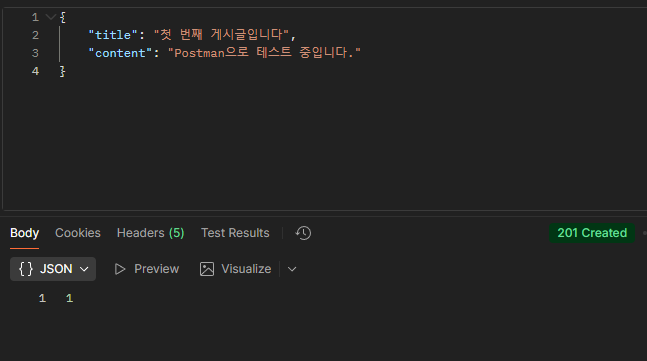
게시글 작성 - 댓글 작성: POST /api/posts/1/comments로 방금 만든 1번 게시글에 댓글을 작성합니다.

댓글 작성 - 댓글 조회: GET /api/posts/1/comments로 1번 게시글의 댓글 목록을 조회하여, 방금 작성한 댓글이 잘 보이는지 확인합니다.
- 게시글 수정/삭제: PUT /api/posts/1, DELETE /api/posts/1 API가 정상적으로 동작하는지 확인합니다.

이것으로 게시판의 모든 핵심 CRUD API 구현을 마쳤습니다.
하지만 지금은 tempUserId를 사용하고 있어 누구나 다른 사람의 글을 수정하고 삭제할 수 있는 등 보안에 매우 취약합니다. 다음 포스팅에서는 Spring Security와 JWT를 도입하여 로그인 기능을 완성하고, API에 대한 접근 권한을 제어하는 인증/인가 기능을 구현해 보겠습니다.
'개발 공부 > 백엔드' 카테고리의 다른 글
| 제미나이와 게시판 만들기: (7) 인가(Authorization) 적용과 API 문서화 (0) | 2025.10.08 |
|---|---|
| 제미나이와 게시판 만들기: (6) Spring Security와 JWT로 인증/인가 구현하기 (0) | 2025.10.08 |
| 제미나이와 게시판 만들기: (4) 컨트롤러 구현과 Postman API 테스트 (0) | 2025.10.05 |
| 제미나이와 게시판 만들기: (3) 서비스 계층 구현과 테스트 (0) | 2025.10.04 |
| 제미나이와 게시판 만들기: (2) 순수 JPA로 리포지토리 구현하기 (0) | 2025.10.03 |